
Stream control
From the Stream tab, you edit your broadcast info, platform by platform or all at once.
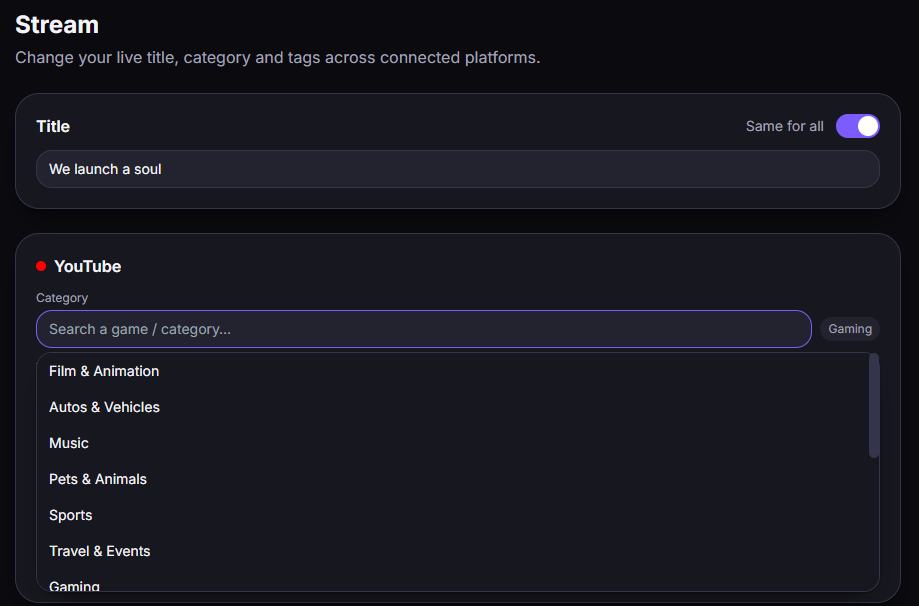
What you can set
Section titled “What you can set”- Title — shared across platforms, or customized per platform.
- Category / game — game search on Twitch and Kick; broad category on YouTube (Gaming, etc.).
- Tags — on all three.
- Description — YouTube only.
Capability matrix
Section titled “Capability matrix”| Title | Category / Game | Tags | Description | |
|---|---|---|---|---|
| Twitch | ✅ | ✅ (game search) | ✅ | ❌ |
| YouTube | ✅ | ⚠️ broad category (no specific game) | ✅ | ✅ |
| Kick | ✅ | ✅ (search) | ✅ | ❌ |
Good to know
Section titled “Good to know”- YouTube: title/description can only be edited with an active or scheduled live; no “game title” via the API (YouTube Studio only).
- Twitch: no per-stream description; the live notification can’t be edited via the API.
- Kick: outside a live, the category/tags shown match the last value applied from Streamly.
Details on the Limitations page.