
Connect Kick
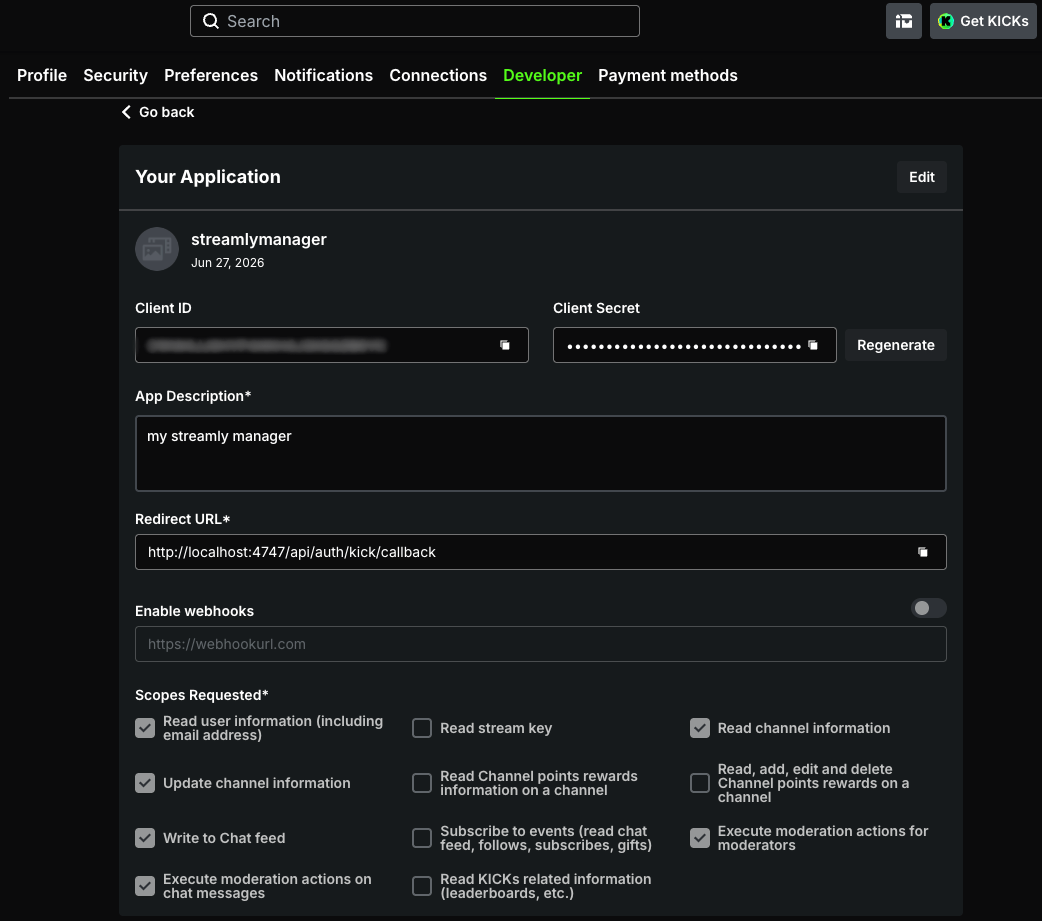
Kick uses OAuth (PKCE). You create a developer app and — unlike Twitch — you must explicitly enable the right permissions on the app, otherwise some actions fail (401 error).
1. Create the Kick app
Section titled “1. Create the Kick app”- Go to kick.com/developer (or your Kick developer settings).
- Create an app and add the redirect URL:
http://localhost:4747/api/auth/kick/callback
2. Enable the permissions (important)
Section titled “2. Enable the permissions (important)”On the Kick app, check exactly:
- Read user information
- Read channel information
- Write to Chat feed
- Update channel information (for stream control)
- Both moderation permissions:
- “Execute moderation actions for moderators”
- ”… on chat messages”
3. Connect, then reconnect after any change
Section titled “3. Connect, then reconnect after any change”Paste the credentials into Connections → Kick, then connect. After every change to the permissions, apply the golden rule: disconnect then reconnect to regenerate the token.
⚠️ Good to know about Kick
Section titled “⚠️ Good to know about Kick”- No real-time individual follow events: Streamly receives the count of followers, not an alert per new follower.
- Off-live, the category/tags shown come from the last value applied from Streamly (the Kick API doesn’t expose them off-live).
See Limitations.